

TRUST BANK
INTRODUCTION
Trust Bank is a global leader in financial services with a rich history dating back to the early 1900s. Still, its user interface (UI) did not fully reflect its legacy or commitment to its technological innovation. An overhaul was overdue and needed to ensure the bank could attract and retain tech-savvy clients.
Our goal was to develop a new UI highlighting Trust Bank's long-standing heritage and dedication to customer service and showcasing its role as a technology leader in the financial industry. I led the UI re-design project for Trust Bank, overseeing every aspect of the new design system. This involved enhancing the visual appeal, improving the overall user experience (UX), and integrating cutting-edge features.
OVERVIEW
Problem
While Trust Bank is a global leader in financial services with a rich history dating back to the early 1900s, its user interface (UI) still needs to fully reflect its legacy or commitment to its technological innovation.
An overhaul was overdue and needed to ensure the bank could attract and retain tech-savvy clients.
Reviving Trust Bank - Bridging Tradition and Innovation
Goals
We aimed to develop a new UI highlighting Trust Bank's long-standing heritage and dedication to customer service and showcasing its role as a technology leader in the financial industry.
I led the UI re-design project for Trust Bank, overseeing every aspect of the new design system. This involved enhancing the visual appeal, improving the overall user experience (UX), and integrating cutting-edge features.
RESEARCH
To guide this transformation, we embarked on a user research journey.
Persona Development
We gained granular insights into their expectations, behaviors, and pain points by crafting abridged personas representing target user segments. This helped us empathize with their needs and desires for a modern banking experience.

Key Insights
-
Clear navigation and layouts were needed to cater to users of all ages.
-
A comprehensive suite of financial services was needed to be accessible.
-
Advanced mobile and online banking features should be prioritized.
-
Security features should be highlighted prominently to build user trust and safety.
-
Users needed a smooth experience across all touchpoints.
Journey Map
I have developed a user journey map to delve into the highs and lows of a typical customer banking experience. This User Journey Map is meticulously crafted to identify existing challenges, shortcomings, and potential areas for enhancement in our banking services. The aim is to elevate the customer experience, ensuring it is seamless, secure, and tailored to meet their financial needs. Below is a detailed illustration of the user journey map for Lisa, showcasing each step of their interaction with our banking services.

Key Insights
-
A necessity for a user-friendly mobile banking app that allows instant, secure money transfers
from remote locations. -
Real-time transaction notifications are important for both sender and receiver to ensure peace of mind.
-
A simplified authentication process that balances security with ease of use is needed when accessing banking services outside traditional settings.
MAPPING THE LANDSCAPE
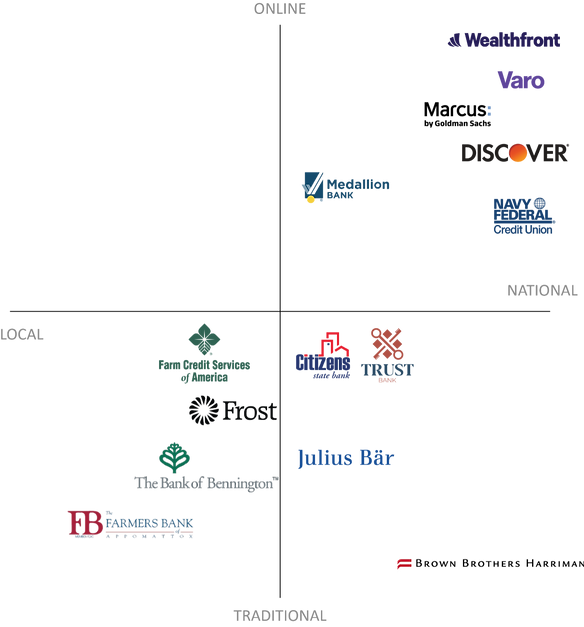
I then constructed Perceptual Maps to represent how Trust Bank positioned itself against competitors in key areas like,
1) Locations/ Access and 2) Banking Services.
Perceptual Map: Banking Access
Perceptual Map: Banking Services
Key Insights
Based on the Trust Bank's placement of the location in the Perceptual Maps:
-
Local and national needs must be balanced.
-
Personalized financial advice tools should be provided for tailored guidance.
-
The UI needs to be modernized while respecting heritage and traditional values.
INSIGHTS & REFLECTIONS
DESIGN APPROACH/ SOLUTION
Key Branding Decisions
-
Blend Trust Bank's rich history and legacy with a modern and innovative UI/UX design that appeals to tech-savvy clients.
-
Offer personalized advice and solutions to meet individual financial goals.
-
Ensure a seamless omnichannel experience.
-
Emphasize strong security measures and data privacy to build
-
trust with users.
-
Create a simple, user-friendly interface that is easy to navigate and understand for users of all ages and technical abilities.
Moodboard Objectives
-
Minimalist visuals that convey orderliness and efficiency, reflecting
a seamless banking experience. -
Images showing loyalty emphasize Trust Bank's commitment to
long-term customer relationships. -
Modern design elements demonstrate an embrace of
technological advancements. -
Secure-looking visuals reassure users about data protection
and financial security. -
Friendly imagery reinforces a welcoming and approachable
brand personality.
INSIGHTS & REFLECTIONS
MOODBOARD

INSIGHTS & REFLECTIONS
BRANDING ELEMENTS
Trust Bank's brand combines clean lines and fresh colors with imagery emphasizing security, loyalty, personalization, and seamlessness.
Style Guide Decisions
-
I chose classic fonts and subtle design elements that nod to the bank's history while keeping the overall look fresh and contemporary.
-
I wanted Trust Bank to have fresh colors to create a modern, sleek aesthetic that resonates with younger, tech-focused demographics.
-
My logo emphasized secure imagery and transparent communication, helping address concerns and build trust.
Style Guide

INSIGHTS & REFLECTIONS
DEVELOPMENT
User Flow
I created a user flow for first-time users who want to pair their watch to the Trust Bank app. User flow maps out each step a user takes, from their entry point to their final interaction. As a designer for Trust Bank, I chose user flow for the following:
-
Understand how users interact with your product and
what their goals are. -
Identify any confusing or frustrating steps in the user journey.
-
Optimize the design and functionality of Trust Bank to make it easier and more enjoyable to use.

Site Mapping
I created a Site Map to visually represent the structure and content of a Trust Bank’s Website. The key features of Site Mapping are:
-
Helps organize content logically and intuitively.
-
It makes it easier for users to find what they're looking for.
-
It helps search engines understand your site's structure and content.
-
Aids in website development and redesign projects.

Trust Bank Site Map Analysis
-
Labels are clear and concise, using common terminology that users understand.
-
Each category and subcategory cater to specific user needs, focusing on relevant
financial products and services. -
The site map avoids overwhelming users with excessive information by limiting the
depth to two levels.
INSIGHTS & REFLECTIONS
WIREFRAMES


INSIGHTS & REFLECTIONS
FINAL DESIGNS
Visual Designs
-
Bold aesthetic balanced by warmth, fostering trust and confidence.
-
Primary colors convey heritage and dynamism, appealing to established and forward-thinking clients.
-
Subtle, warm accents soften the tone and create a welcoming feel.
-
Modern, clear typography enhances readability and professionalism.
Prototyping Tools & Types
-
Low-fidelity wireframes: These basic paper and digital sketches focused on functionality and layout, iteratively defining key user flows and screens.
-
Mid-fidelity prototypes: These digital prototypes in XD added some visual elements like placeholder text and color variations.
-
High-fidelity prototypes: Clickable XD prototypes incorporated the design system, simulating the actual user experience
as closely as possible.
Webpage


Mobile App


Smart Watch App

INSIGHTS & REFLECTIONS
KEY INSIGHTS
Key Design Strengths
-
The design system retained classic elements while incorporating clean lines, fresh colors, and micro-interactions, creating a modern and engaging feel.
-
Uncluttered layouts, intuitive navigation, and clear information hierarchy will help improve user satisfaction and task completion rates.
-
Adherence to WCAG guidelines will ensure inclusivity for diverse users, reflecting Trust Bank's commitment to
customer service.
Areas for Improvement
-
Further testing with diverse user groups could reveal opportunities to optimize information hierarchy and
content organization. -
The mobile app experience wasn't fully addressed within this project due to scope limitations. Seamless integration and consistency across web and mobile platforms will be crucial
for a unified user journey.
INSIGHTS & REFLECTIONS
NEXT STEPS
Continuing the Journey
-
Conduct comprehensive user testing with diverse demographics across web and mobile platforms.
-
Implement A/B testing for specific design elements and features to gather data on user preference and optimize
the design for maximum impact. -
Develop a concise and engaging app tour highlighting key features and functionalities, making it easy for first-time users to navigate and understand the value proposition.
-
Integrating advanced investment tools and analytics features for sophisticated users could be explored in future iterations.
-
Expanding language options while maintaining design consistency will require further planning and
resource allocation.